
SigaME

How SigaME works

No jargon and no rush: which devices exist, what each one does, how SigaME finds where things and people are, and where to use each module.

Contact us

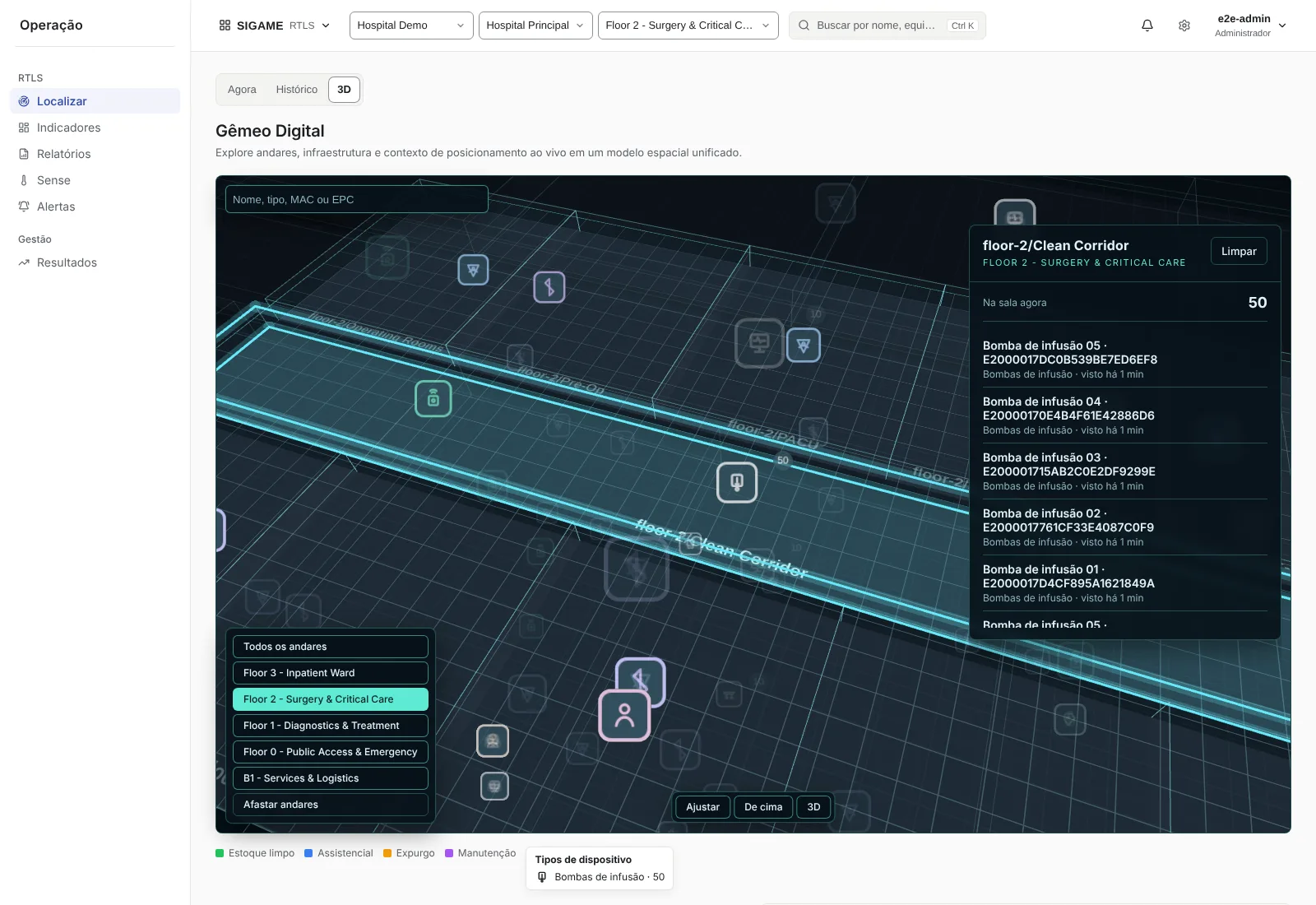
Selected room in the digital twin with the list of items inside it

01

Who is who: the SigaME devices

SigaME sees the hospital through devices. Each one has a role: some stay fixed in the building, some go on equipment and some are carried by people.

Understanding those roles is the first step to understanding everything else. The table shows where each device sits, what it does and how the system finds out where it is.

In one sentence: what goes on the person talks to them, what goes on equipment only says where it is, and what stays in the building listens to everything.

Illustration: the platform at the centre, linked to the professional's eCom, the eTag, the beacon, the RFID tag and the fixed infrastructure
DeviceWhere it isWhat it doesHow it is located
eComWith the professionalTwo-way pager: receives tasks and alerts and lets the user answer with buttonsThrough the hospital Wi-Fi (the eCom+ also uses 4G and GPS)
eTagOn equipment and at fixed pointsSmart tag: reports the item position and can measure temperature and humidity or act as a beacon gatewayThrough the hospital Wi-Fi
BLE beaconOn carts, pumps and other mobile equipmentAnnounces a code over Bluetooth Low EnergyBy the fixed BLE gateways that hear it
Passive RFID tagOn boxes, trays, kits and wristbandsAnswers the reader with its code, with no batteryBy RFID readers, antennas and portals
Wi-Fi anchorFixed in the buildingActs as a signal reference and measures the environmentHas a known position
BLE gatewayFixed in the buildingListens to beacons and reports what it heardHas a known position
RFID reader and portalFixed at passage pointsLogs who came in and who went outHas a known position
eChargerAt the charging stationCharges up to eight eCom devices and identifies the user by proximity cardHas a known position

02

eCom: the professional's two-way pager

The eCom is a small device the professional carries. Think of it as a pager that talks in both directions: the platform sends a message and the professional answers with a button.

At the same time, the hospital Wi-Fi locates the eCom. That is how SigaME knows who is closest to each task, without anyone having to say where they are.

Step by step

  1. The platform calls. A Flow task or a TRR code reaches the eCom with an audible alarm, vibration and the color of the alert.
  2. The professional reads. The screen shows what to do and where.
  3. The professional answers. Three buttons accept, decline or complete. The answer goes back to the platform right away.
  4. The system follows. While the person moves, RTLS shows where they go, and arrival at the place can be recognized on its own.
Example

A porter receives a patient transport to the CT scan and accepts with a button. When he reaches the room, Flow marks the arrival without anyone having to call.

What to expect

  • One eCom serves one module at a time, Flow or TRR, and each module has its own teams.
  • For outdoor areas, the eCom+ adds 4G cellular and GPS.

In one sentence: the eCom puts the right task in the right hand and also says where that person is.

Illustration: the platform sends a message to the eCom, which shows the task and sends the professional's answer back

03

What goes on equipment: tags and beacons

Equipment does not talk, but it can carry a tag that says where it is. There are three families, and the hospital chooses according to the cost and accuracy it needs.

  • eTag (Wi-Fi)

    A smart tag that talks over the Wi-Fi network and is located like the eCom. It can also measure temperature and humidity or act as a beacon gateway.

  • BLE beacon

    A tag that announces a code over Bluetooth. It is the choice for carts and mobile equipment. Fixed BLE gateways listen and report.

  • Passive RFID tag

    Has no battery. It answers when it passes near an antenna, at portals and reading points. Ideal for boxes, trays and kits.

In one sentence: the same question, "where is it?", has three technical answers, and SigaME uses all three together.

Illustration: three pieces of equipment carrying an eTag, a beacon and an RFID tag, each one being picked up in a different way

04

What is RTLS?

RTLS stands for Real Time Location System: a system that finds, in real time, where people, equipment and materials are.

It brings together what you have just seen: devices on people and equipment, a fixed infrastructure that picks up the signals, and a platform that calculates and shows the result.

Step by step

  1. Each item carries a device. An eCom, an eTag, a beacon or an RFID tag.
  2. The building listens. Wi-Fi anchors, BLE gateways and RFID readers pick up the signals.
  3. The platform calculates. Each technology has its own location engine, and the result converges into one common format: place, floor and time.
  4. The answer appears. On the live map, in the 3D digital twin and in words.
Example

When you search for an infusion pump, SigaME answers "near Room 12, seen 40 min ago" and shows the point on the map. Free equipment appears first.

What to expect

  • The system shows the level of certainty it really has: the point on the map, just the room, just the floor or only the proximity.

In one sentence: RTLS replaces "has anyone seen the infusion pump?" with a look at the map.

Illustration: a tag sends a signal, a fixed point picks it up, the platform calculates and the map shows the position

05

How we locate with Wi-Fi

Wi-Fi signal gets weaker with distance and with walls. So, at each point of the building, every anchor arrives with a different strength, and the set of those strengths works as a fingerprint of that place.

SigaME learns those fingerprints at installation and then uses them to find where a device is.

Step by step

  1. The device listens. The eCom measures the signal strength of the anchors around it.
  2. It compares with the radio map. The radio map keeps, per floor, the expected fingerprint of each point.
  3. It calculates the most likely point. A probabilistic engine picks where that combination of signals is most likely to happen.
  4. It follows the movement. When the device moves, the system uses the recent history to smooth and confirm the position.
  5. It confirms floor, room and position. The answer goes from general to specific: first the floor, then the room, then the point.
Example

The eCom in the corridor hears anchor A strong, B medium and C weak. That combination only fits one stretch of the corridor on the radio map, and that is where SigaME marks the professional.

What to expect

  • Changes in the building can alter the signal, which is why calibration and quality alerts exist.

In one sentence: signals from several anchors become a position on the map.

Illustration: three Wi-Fi anchors measure a device signal and the platform finds the most likely point on the map

06

What are anchors?

Anchors are fixed Wi-Fi devices installed at known points in the building. They act as references: the system knows exactly where each one is.

Besides helping with location, anchors measure each other's signal, which feeds auto-calibration, and can also measure the temperature and humidity of the room they are in.

Step by step

  1. They stay at fixed points. The position of each anchor is registered on the floor plan.
  2. They measure the signal. They pick up the signal of devices and of their neighbors.
  3. They report to the platform. The measurements become part of the radio map and of environment monitoring.
Example

An anchor in the third-floor corridor helps locate the eCom devices passing by and, at the same time, reports the temperature and humidity of that place.

What to expect

  • The better distributed the anchors are, the better the location coverage.

In one sentence: anchors are the fixed reference points of the building.

Illustration: a fixed wall anchor sends a signal, talks to other anchors and measures temperature and humidity

07

What are BLE gateways and beacons?

A beacon is a small tag that announces its code over Bluetooth Low Energy (BLE). It can go on a cart, an infusion pump or other mobile equipment.

BLE gateways are fixed receivers that listen to beacons and report what they heard. A beacon does not talk to the hospital on its own: the gateway does.

Step by step

  1. The beacon announces. It repeats its code from time to time.
  2. The gateways measure. Each gateway that hears it reports the signal strength it received.
  3. The platform puts the reports together. With the reports of several gateways and the floor radio model, it estimates the position.
  4. It returns the best possible level. The result can be the point on the map, the room, the floor or the proximity.
Example

The emergency cart carries a beacon. Two corridor gateways hear it, and SigaME shows "in Room 12" to anyone who looks for it.

What to expect

  • The platform processes hundreds of beacons at the same time, and the quality of the position depends on gateway coverage.

In one sentence: the beacon speaks, the gateways listen and SigaME decides where it is.

Illustration: a beacon on a cart announces its code and two BLE gateways listen and report to the platform

08

RFID and portals: who came through here

Passive RFID tags have no battery. When they pass near an antenna, they take energy from the reader itself and answer with their code. That is why they suit surgical boxes, trays and kits.

At known places, such as a room door, readers log the passage. With direction portals, the system also knows whether the item came in or went out.

Step by step

  1. The reader emits a field. The antenna creates a reading area at a known place.
  2. The tag answers. Once inside the area, it sends back its code.
  3. The system links it to the place. Because the reader position is known, the item is now "at that place".
  4. The portal gives the direction. With direction portals, the reader reports whether it was an entry or an exit.
Example

A surgical box goes through the operating-room portal, and the system logs that it came in.

What to expect

  • RFID shows presence and passage at known places, not a continuous position. Items identified only by RFID appear on the map at the reader position.

In one sentence: RFID marks presence and passage at known places, with no battery in the tag.

Illustration: a box with an RFID tag goes through a portal and the system logs that it came in

09

From signal to "in Room 12"

The calculated position becomes a useful place, such as a room, ward, unit or bed, and a floor. The answer comes in words and on the map.

SigaME is honest about certainty: it shows the exact point when it has evidence for it and, when it does not, shows only the room, the floor or the proximity.

In one sentence: SigaME would rather say "near Room 12" than invent a precision it does not have.

Selected room in the digital twin with the list of items inside it
Click a room in the digital twin and SigaME lists the items that are in it right now.

10

The SigaME Mobile app

The professional's phone can also be part of the system. The app delivers Flow tasks and alerts even when it is in the background.

The same device can also be located.

Step by step

  1. Sign in and shift. The professional signs in to the app and opens the shift.
  2. Receives the task. A notification wakes the app, with no need to keep it open.
  3. Accepts, declines or completes. With one tap, and with "undo" for 2 seconds to fix a mistake.
  4. Is located. The device reads Wi-Fi and Bluetooth signals so the system knows where it is.
Example

A cleaning assistant receives a room task on the phone and accepts it, and Flow follows the start and end of the cleaning through her presence.

What to expect

  • Push notifications work on Android. On Windows, the app locates but does not receive push notifications.

In one sentence: the app puts the right task in the right hand.

Illustration: a phone receives a task with a notification and the professional accepts or declines with one tap

11

Calibration and auto-calibration

To locate well, SigaME needs to learn how the radio signal behaves on each floor. This produces the radio map. There are three ways to build and maintain it:

Step by step

  1. Survey. The installer walks the floor and marks known points, with the app.
  2. Auto-calibration. Anchors measure each other's signal, and the system uses those measurements to build and maintain the map.
  3. Quality and recalibration. Panels show coverage, error and heat maps, and the system warns when it is time to recalibrate.
Example

After a renovation, the quality panel shows an area with a larger error. The installer runs a quick survey in that stretch, and location becomes accurate again.

What to expect

  • The radio map is per floor, and auto-calibration helps keep it fine-tuned over time.

In one sentence: auto-calibration helps keep the radio map fine-tuned over time.

Illustration: the installer walks the floor marking points, anchors measure each other and the map quality rises

12

A transport request, from start to finish

See how the devices work together in an everyday situation: taking a patient to an exam.

  1. The request. Nursing picks the unit favorite and sends it in two taps.
  2. The choice. Flow sees who is free and who is closest, using the RTLS of the eCom devices, and offers the job to the first in the fair queue.
  3. The alert. The porter's eCom rings and vibrates, and the screen shows from where and to where.
  4. The acceptance. He accepts with a button. Whoever asked sees that the job was accepted and the arrival estimate.
  5. The way. RTLS follows the movement on the map, and the coordinator sees everything in real time.
  6. The arrival. With the eCom at the place, arrival is marked on its own.
  7. The completion. The porter completes. Everything is recorded with a timestamp, and the times go into the reports.

In one sentence: nobody called, nobody searched and every step was recorded.

Where to use each module

Choose by the problem that weighs the most today. These are everyday examples.

Flow

When the problem is getting the right task to the right person, on time.

Transport to an exam

Nursing calls the porter in two taps. Flow offers the task to whoever is available and shows the requester when it was accepted and when the porter arrives.

Operating-room cleaning

The room becomes free and the cleaning task is created. With RTLS, its start and end are marked by the professional's presence.

Patient discharge

The discharge creates the terminal cleaning of the bed on its own.

Wall button call

The badge and a button held for 5 seconds create the task, already with the right location.

RTLS

When the problem is knowing where things are and whether there is enough.

Finding an infusion pump

Search by name or asset tag and see "near Room 12". Free equipment shows up first.

Minimum stock per unit

If a unit falls below its minimum of free equipment, RTLS warns and creates the restocking task.

Surgical box on its way

An RFID portal logs entry and exit and shows whether the box has reached the operating room.

Maintenance up to date

Equipment not seen for more than 7 days and overdue maintenance appear on a list.

Journey

When the problem is knowing how long the patient waits at each step.

Waiting for an exam

The board shows the current step and the time in it, with an alert when it passes the target.

Informed companion

A QR code shows the step and the typical wait, with no login and no personal data.

Room turnover

The report measures patient exit, cleaning, idle time and the next patient's entry.

TRR

When the problem is calling the right clinical team, fast and with a record.

Codes and colors follow each hospital's protocol.

Code Blue

Common example: cardiac arrest. TRR calls one professional per profile, with an alarm on the eCom, and moves to the next if someone declines or does not answer.

Code Yellow

Common example: clinical deterioration. The team is formed from the profiles defined for that code, and arrival is recognized by location.

The hospital's other codes

Such as Code Orange, sepsis or stroke: the hospital sets deadlines, required profiles and who answers. Everything stays in the audit trail.

Panic button

One tap on the eCom warns the managers, with the location, without opening an occurrence.

Sense

When the problem is keeping temperature, humidity and pressure within range.

Vaccine refrigerator

A 2 to 8 °C profile. If the temperature leaves the range for the configured time, the alarm goes off and the warning goes up by email.

Pharmacy and storeroom

A temperature map per room and a PDF compliance report, instead of the paper log.

Blood products and samples

Sensors with calibration certificates and validity controlled, with an expiry warning.

Operating room

The pressurization indicator warns when the room loses its usual pressure relative to the corridor. It is an indication, not a certification.

Frequently asked questions

Do I need to buy every module?

No. Each module is licensed separately or together. The hospital starts with the most urgent problem and grows later.

Does SigaME need to integrate with the hospital system (HIS)?

No. SigaME works on its own: all set-up is done inside it. Integration with the HIS, CCTV and email is optional and does not block deployment.

What about patient privacy?

The patient is identified only by record number. Name, tax ID and date of birth never enter the system, and every look-up of a journey is logged.

Want to see this working at your hospital?

Tell us which problem weighs the most and we will show how SigaME solves it.

Contact us